


Social proof is one of the most powerful conversion tools available to WordPress site owners. When visitors see that other people trust your business, they’re far more likely to take action themselves — whether that’s making a purchase, signing up for a newsletter, or downloading a resource.
Research consistently shows that social proof elements can increase conversion rates by 10–15%, and in some cases significantly more. But here’s the problem: most WordPress social proof plugins are designed around one specific approach — intrusive FOMO notification popups that flash in the corner of your screen every few seconds.
If you’ve ever browsed an online store and seen those “Sarah from Texas just bought…” popups appearing non-stop, you know exactly what we mean. They work for some sites, but for many businesses they feel pushy, raise privacy concerns, and can actually damage trust rather than build it.
The truth is, social proof comes in many forms. The most effective approach depends on your business, your audience, and the kind of trust you’re trying to build. In this guide, we’ll cover the full range of social proof plugins available for WordPress in 2026 — from simple trust widgets to live notification systems to full testimonial platforms — so you can choose the right tool for your site.
The Two Types of Social Proof (And Why It Matters)
Before we dive into the plugins, it’s worth understanding the two fundamentally different approaches to social proof on websites.
Dynamic FOMO Notifications are the popup-style alerts that show real-time or recent activity. “John from London just purchased Product X” or “47 people are viewing this page right now.” These create urgency through fear of missing out. They work well for high-traffic eCommerce stores where there’s genuine activity to display, but they require ongoing transaction data, often depend on external services, and can feel manipulative on smaller sites where the activity is sparse.
Static Social Proof Widgets are the trust signals you see on almost every successful SaaS landing page and business website — overlapping customer avatars, star ratings, and text like “Join 10,000+ happy customers.” Think of sites like Stripe, Basecamp, or Mailchimp. These build trust through implied popularity without the aggressive urgency tactics. They’re clean, professional, and work for any site regardless of traffic volume.
Most comparison articles only cover the first category. This guide covers both, because the right choice depends entirely on what your site actually needs.
1. Easy Social Proof Lite (Best Free Static Social Proof Plugin)
Easy Social Proof takes a fundamentally different approach to social proof compared to most plugins on this list. Rather than showing live notification popups, it lets you add the kind of professional trust widgets you see on high-converting SaaS landing pages — overlapping customer avatars, star ratings, and customisable trust text.
This is the social proof style used by companies like Stripe, Notion, and Basecamp. It’s clean, it’s credible, and it works on any site regardless of how much traffic or how many sales you’re generating.
What makes it different:
Most social proof plugins need a steady stream of real transactions to display. If you’re a new business, a freelancer, a blogger, or a small WooCommerce store, those “someone just bought…” popups either show nothing or look obviously fake. Easy Social Proof doesn’t have this problem. You configure the widget to match your brand and your numbers, and it displays a polished, professional trust signal immediately.

Get our FREE compact Easy Socialal Proof Lite WordPress plugin designed using the latest research
Core features (Free version):
- Overlapping avatar display with up to 10 images from your media library, with customisable size (24–64px), overlap distance, border width, and border colour
- Star ratings from 1–5 stars, toggleable, with customisable colour
- Custom text — editable messages like “Join 1,000+ happy subscribers” with adjustable colour and font size
- Layout options — horizontal or vertical layout with left, centre, or right alignment
- Lightweight and fast — no external API calls, no JavaScript tracking, no third-party dependencies
- GDPR-friendly — no visitor data is collected or transmitted
Pro version features:
This is where Easy Social Proof really separates itself from the competition. The Pro version adds:
- Live WooCommerce sales popups — real-time FOMO notifications showing recent purchases, putting it in direct competition with TrustPulse and NotificationX
- Trust badges — professional credibility signals you can place anywhere on your site
- Review cards — styled customer review displays without needing a separate testimonial plugin
- AI-generated avatars — so you don’t need to source customer photos
- Advanced positioning options, additional styling controls, and priority support
This makes Easy Social Proof Pro the only plugin on this list that covers both static social proof (avatars, stars, trust text) and dynamic FOMO notifications (live sales popups) in a single plugin. Every other option requires you to install two or more separate plugins to achieve the same coverage.
Who it’s best for:
The free version is ideal for any WordPress site that wants professional-looking trust signals immediately — business websites, landing pages, SaaS sites, blogs, and membership sites. It’s particularly strong for sites that don’t yet have high transaction volumes, because the static trust widgets work from day one regardless of traffic.
The Pro version is the best choice for WooCommerce store owners who want the complete social proof toolkit — static trust widgets for credibility plus live sales notifications for urgency — without juggling multiple plugins and subscriptions.
Pricing: Free on WordPress.org. Pro version available at easysocialproof.io.
2. TrustPulse (Best Live Notification Plugin)
TrustPulse is the most popular real-time social proof notification plugin for WordPress. It tracks activity on your site — purchases, signups, form submissions — and displays small popup notifications showing that activity to other visitors.
It’s owned by the same company behind OptinMonster and WPBeginner, which means it gets significant promotion across their network of sites. It’s also a genuinely solid product if live FOMO notifications are what you need.
Core features:
- Real-time activity tracking for purchases, signups, and form submissions
- “On Fire” notifications showing aggregate activity (“47 people bought this in the last 24 hours”)
- Visitor analytics showing current page views
- Static action messages for promotions and announcements
- Customisable notification design and positioning
- Display rules to control which pages show notifications
- Built-in analytics to track notification performance
Strengths:
TrustPulse is straightforward to set up and the notification designs look clean and professional. The targeting options are strong — you can control exactly which pages show notifications and set delays to avoid overwhelming visitors. The analytics dashboard is useful for optimising your campaigns over time.
Weaknesses:
TrustPulse is a SaaS product, meaning your data is sent to and processed on their servers. The free version is limited to 500 unique sessions per month, which most sites will exceed quickly. It requires ongoing monthly subscription payments, and it fundamentally depends on having real activity to display — new sites or low-traffic sites won’t have much to show. It also only handles notification popups — no static trust widgets like avatar stacks, star ratings, trust badges, or review cards. To get that kind of coverage alongside TrustPulse, you’d need a second plugin.
Pricing: Free version limited to 500 sessions. Paid plans from $5–$39/month.
Who it’s best for: Established eCommerce stores and high-traffic sites with consistent transaction volumes.
3. NotificationX (Best Free FOMO Notification Alternative)
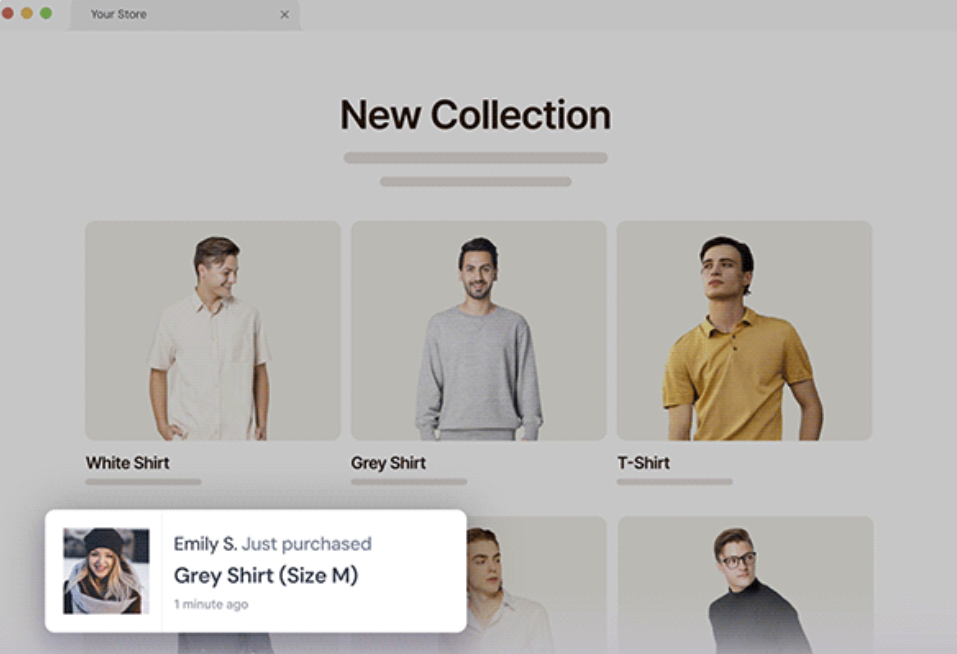
NotificationX is a WordPress-native alternative to TrustPulse that runs entirely on your own server rather than routing data through an external service. It offers a wide variety of notification types including sales alerts, review notifications, download counts, email subscription confirmations, and comment notifications.
Core features:
- Multiple notification types: sales, reviews, downloads, comments, email signups
- WooCommerce, Easy Digital Downloads, and LearnDash integration
- Google Reviews integration
- Customisable notification design
- Page-level display targeting
- Notification scheduling and timing controls
Strengths:
The biggest advantage of NotificationX over TrustPulse is that it runs on your WordPress installation — no external SaaS dependency, no data being sent to third-party servers. The free version is considerably more generous than TrustPulse’s, and it offers a wider range of notification types out of the box. The WordPress.org reviews are generally positive.
Weaknesses:
The interface is more complex than TrustPulse, and the premium pricing is steep — $39 to $149 per year, with lifetime plans from $299 to $649. Like all FOMO notification plugins, it still requires genuine site activity to be effective. The design options, while adequate, aren’t as polished as TrustPulse.
Pricing: Free version on WordPress.org. Paid plans from $39–$149/year.
Who it’s best for: Site owners who want live notifications but prefer to keep data on their own servers.
4. Thrive Ovation (Best Testimonial Management Plugin)
Thrive Ovation is a dedicated testimonial management plugin that helps you collect, organise, and display customer testimonials on your WordPress site. It’s part of the Thrive Suite ecosystem.
Core features:
- 30+ testimonial display templates (sliders, grids, carousels, sections)
- Testimonial capture forms to collect reviews directly from your site
- Import testimonials from social media (Google, X/Twitter, Facebook)
- Convert WordPress comments into testimonials
- Dynamic testimonial lists filtered by tags
- WYSIWYG editor for full design customisation
Strengths:
Thrive Ovation is the most comprehensive testimonial management solution we’ve seen. The ability to turn blog comments and social media posts into testimonials is genuinely useful, and the display templates are well-designed. If your social proof strategy centres on written customer reviews, this is the strongest option available.
Weaknesses:
It’s not cheap. Thrive Ovation alone costs $49/year, but you really need the full Thrive Suite ($299/year) to get proper value. The setup process isn’t immediately intuitive — you need to create shortcodes through the Gutenberg editor to display testimonials, which isn’t obvious at first. It also only handles testimonials — no live notifications, no trust widgets.
Pricing: $49/year standalone, or $299/year as part of Thrive Suite.
Who it’s best for: Businesses that have a strong collection of customer testimonials and want to showcase them professionally.
5. Smash Balloon (Best for Social Media Social Proof)
Smash Balloon is a suite of social media feed plugins that lets you pull content from Facebook, Instagram, X/Twitter, YouTube, TikTok, Google Reviews, Trustpilot, and more directly into your WordPress site.
Core features:
- Individual plugins for each social platform
- Reviews feed plugin pulling from Google, Yelp, Trustpilot, TripAdvisor
- Customisable feed layouts and styling
- Hashtag feeds and tagged post displays
- Feed analytics for tracking engagement
- Performance-optimised to minimise site speed impact
Strengths:
If your business has an active social media presence, Smash Balloon is an excellent way to bring that social proof directly onto your website. The reviews feed plugin is particularly strong — pulling verified reviews from Google and Trustpilot carries significant credibility. The feeds are well-designed and the performance optimisation is noticeably better than most social feed plugins.
Weaknesses:
The All Access Bundle costs $299/year, which is significant. Individual plugins range from $49–$149/year. The free versions are quite limited — for example, the reviews feed free version can only pull from Google and Yelp. It’s also a different type of social proof — it works best as supplementary evidence rather than a primary conversion tool.
Pricing: Free versions available. Individual plugins $49–$149/year. All Access Bundle $299/year.
Who it’s best for: Businesses with active social media accounts and strong review profiles on platforms like Google and Trustpilot.
6. WPfomify (Premium FOMO Notifications)
WPfomify is a premium-only social proof notification plugin that competes directly with TrustPulse and NotificationX. It displays recent sales, signups, and reviews as popup notifications.
Core features:
- Recent activity notifications for WooCommerce, Easy Digital Downloads, and forms
- Customer review notifications with star ratings
- Product image display in notifications
- CSV import for manual notification data
- Visitor targeting (new, returning, logged in/out)
- Mobile display controls
Strengths:
WPfomify’s standout feature is the ability to display product images in notifications, which makes the popups more visually engaging than text-only alternatives. The CSV import feature is useful for sites that want to show notifications from data sources that aren’t directly integrated. The visitor targeting options are granular.
Weaknesses:
There’s no free version, and pricing starts at $99/year — considerably more expensive than TrustPulse or NotificationX for similar functionality. The plugin hasn’t seen as much recent development activity as its competitors, and the user base is smaller, which means fewer community resources and potentially slower support.
Pricing: $99–$399/year. No free version.
Who it’s best for: WooCommerce stores that want visually rich notification popups and don’t mind paying a premium.
7. OptinMonster (Best for Lead Generation With Social Proof)
OptinMonster is primarily a lead generation and popup tool, but it includes features that make it effective for social proof campaigns. You can create popups that showcase subscriber counts, display countdown timers for urgency, and target specific visitors based on their behaviour.
Core features:
- Drag-and-drop popup builder with hundreds of templates
- Social proof elements including subscriber counts and activity notifications
- Exit-intent technology
- Advanced visitor targeting and segmentation
- A/B testing
- Countdown timers and urgency elements
- Spin-to-win gamification
Strengths:
OptinMonster is incredibly versatile. If you need social proof as part of a broader conversion optimisation strategy — combining popups, slide-ins, floating bars, and fullscreen campaigns — it’s the most powerful option available. The targeting engine is exceptional, letting you show different campaigns to different visitor segments.
Weaknesses:
It’s not a dedicated social proof tool, so if that’s all you need, you’re paying for a lot of functionality you won’t use. There’s no free version, and plans start at $7/month. The popup-heavy approach can feel aggressive if overused, and some visitors actively dislike popup-based marketing.
Pricing: $7–$49/month. No free version.
Who it’s best for: Marketers running multi-channel conversion campaigns who want social proof as part of a broader toolkit.
8. SeedProd (Best Page Builder With Social Proof Blocks)
SeedProd is a drag-and-drop landing page builder that includes dedicated social proof blocks — rotating testimonials, number count animations, star ratings, countdown timers, and Google Business review embeds.
Core features:
- 350+ landing page templates
- Dedicated social proof blocks (testimonials, star ratings, counters, reviews)
- Google Business and social media review embedding
- AI-powered content generation
- Email marketing service integrations
- Coming soon and maintenance mode pages
Strengths:
If you’re building landing pages from scratch, SeedProd lets you incorporate social proof directly into the page design without needing a separate plugin. The template library is extensive and the builder is genuinely intuitive. The number counter animations are a nice visual touch.
Weaknesses:
SeedProd replaces your entire page design — it doesn’t work alongside your existing theme. Social proof blocks are only available in paid plans. And fundamentally, it’s a page builder that includes social proof features, not a dedicated social proof tool. If you already have a theme and page builder you’re happy with, adding SeedProd just for social proof doesn’t make sense.
Pricing: Free version available. Paid plans $39.50–$239.60/year.
Who it’s best for: Site owners who are already using SeedProd as their page builder.
Comparison: Which Plugin Should You Choose?
The right plugin depends on what type of social proof you need and where your site is in its growth journey.
Choose Easy Social Proof if you want clean, professional trust signals (avatars, stars, trust text) that work immediately regardless of your traffic volume. The free version is lightweight, privacy-friendly, and gives your site the same polished social proof look used by major SaaS companies. The Pro version adds live WooCommerce sales popups, trust badges, and review cards — making it the only plugin that covers both static trust widgets and dynamic FOMO notifications in one package. This is the best starting point for most WordPress sites, and the only plugin you’ll need if you upgrade to Pro.
Choose TrustPulse or NotificationX if you run a busy eCommerce store with consistent daily transactions and want to leverage that activity with real-time FOMO notifications. TrustPulse is simpler to set up; NotificationX keeps your data on your own server.
Choose Thrive Ovation if you have a strong collection of customer testimonials and want a dedicated system for managing and displaying them.
Choose Smash Balloon if you have active social media profiles and want to bring that social proof directly onto your WordPress site, particularly if you have strong reviews on Google or Trustpilot.
Choose OptinMonster if you need social proof as part of a broader conversion optimisation strategy that includes popups, email capture, and advanced visitor targeting.
For many sites, the most effective approach is to combine a static trust widget (like Easy Social Proof) with one other tool. The static widget provides always-on credibility, while a secondary tool adds supplementary proof through testimonials, social feeds, or activity notifications as your site grows.
How to Add Social Proof to Your WordPress Site in 5 Minutes
If you want to get started right now with zero cost, here’s the fastest path:
Step 1: Install Easy Social Proof from the WordPress plugin directory (search “Easy Social Proof” under Plugins → Add New).
Step 2: Go to the plugin settings and upload your avatar images. If you don’t have customer photos, the Pro version includes AI-generated avatars — or you can use stock photos from a free resource like Unsplash as placeholders.
Step 3: Set your star rating (most sites use 4.5 or 5 stars).
Step 4: Write your trust text. Keep it specific and credible: “Trusted by 500+ WordPress site owners” works better than vague claims. If you’re just starting out, “Join our growing community of site owners” is perfectly honest.
Step 5: Choose your layout (horizontal works best for most placements) and alignment, then add the widget to your key conversion pages — homepage, pricing page, signup page, and checkout.
That’s it. You now have professional social proof on your site, and it took less time than reading this article.
If you’re running a WooCommerce store and want to add live sales notification popups alongside your trust widgets, the Pro version handles that too — giving you complete social proof coverage from a single plugin.
Final Thoughts
Social proof is not optional in 2026. Visitors expect to see evidence that other people trust your business before they’ll take action themselves.
But social proof doesn’t have to mean annoying popups or expensive SaaS subscriptions. A clean, professional trust widget — the kind used by the most successful companies on the web — is often more effective than a constant stream of FOMO notifications.
Whatever approach you choose, the most important thing is to start. Even a simple avatar stack with a star rating and a trust message will outperform a bare page with no social proof at all.
Frequently Asked Questions
What is social proof and why does it matter for WordPress sites?
Social proof is the psychological principle that people look to the behaviour of others when making decisions. On a website, this translates to trust signals that show visitors other people have already used and valued your product or service. Studies consistently show that social proof elements — whether they’re customer avatars, star ratings, testimonials, or activity notifications — can increase conversion rates by 10–15% or more. For WordPress site owners, adding social proof is one of the highest-impact, lowest-effort changes you can make to improve signups, sales, and engagement.
What’s the difference between FOMO notifications and static social proof?
FOMO (fear of missing out) notifications are the popup-style alerts showing real-time activity: “Jane from New York just purchased Product X.” They create urgency but require ongoing transaction data to work and can feel pushy on some sites. Static social proof — overlapping avatars, star ratings, trust messages like “Trusted by 5,000+ customers” — provides always-on credibility without tracking visitor behaviour or depending on live data. Most successful websites use a combination of both, but static social proof is the better starting point for most sites because it works immediately regardless of traffic volume.
Do I need a paid plugin for social proof?
No. Easy Social Proof is completely free on WordPress.org, and it provides the same style of professional trust widgets used by companies like Stripe and Basecamp. Free versions of TrustPulse and NotificationX also exist, though they’re more limited. Paid plugins become worthwhile when you need advanced features like AI-generated avatars, detailed analytics, or deep WooCommerce integration — but you can build effective social proof with free tools alone.
Is social proof effective for sites with low traffic?
This is where the type of social proof matters enormously. FOMO notification plugins struggle on low-traffic sites because there’s not enough real activity to display — showing “Someone purchased 3 days ago” doesn’t create much urgency. Static social proof widgets work regardless of traffic because they display a curated trust message rather than live data. A new site with 50 monthly visitors benefits just as much from a well-designed avatar stack and star rating as a site with 50,000 visitors.
Does social proof affect site speed?
It depends on the plugin. SaaS-based tools like TrustPulse add external JavaScript and make API calls to their servers, which adds some page load overhead. Social media feed plugins like Smash Balloon load content from external platforms, though they optimise this well. Lightweight plugins like Easy Social Proof that run entirely within WordPress with no external dependencies have minimal impact on page speed — typically adding less than 10KB to your page weight.
Can I use social proof on WooCommerce product pages?
Yes. Most plugins on this list work with WooCommerce. For product pages specifically, FOMO notification plugins like TrustPulse and NotificationX can show recent purchase alerts, while static trust widgets from Easy Social Proof can be placed above the add-to-cart button to reinforce buying confidence. Testimonial plugins like Thrive Ovation can display product-specific reviews. The most effective WooCommerce stores typically combine two or three of these approaches.
Is it ethical to use social proof if I don’t have many customers yet?
As long as you’re honest, absolutely. There’s a difference between showing “Trusted by 10,000+ customers” when you have 12 customers (which is deceptive) and showing a professional trust widget with a message like “Join our growing community” alongside a 5-star rating and clean avatars (which is legitimate branding). As your customer base grows, you update the numbers. Every major company started somewhere, and presenting your brand professionally from day one is good business practice, not manipulation.